
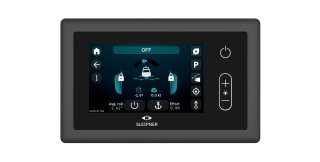
TP43 firmware 3.0: New interface, new modes and more control
Sleipner has released firmware 3.0 for the TP43 stabilizer control panel. The update brings a new interface, improved performance, new operating modes and performance monitoring.
A new interface
Firmware 3.0 is rebuilt from the ground up. Menus are simpler and the panel responds faster. Pin your most-used modes as shortcuts and set up the display the way you use it.
Performance monitoring
Track one or two parameters of your choice on the stabilizer dashboard. The graph shows either a fixed window of the last five minutes or an adaptive window covering the last five roll periods. Use it to analyze stabilizer performance directly on the panel.
New and improved modes for electric stabilizer systems
All modes are now available directly from the main screen.
- Dock Mode: Limits fin movement and keeps the fins close to the hull. Reduces the risk of contact with docks or other boats in tight spaces.
-
Fishing Mode: Adjusts the fins automatically to reduce strain during fast or forceful movement, also in standby.
-
Park Mode: Moves the fins to a dedicated parking position for docking, separate from the centered position used when the system stops.
-
Eco Mode: Reduces maximum fin speed to 60%. Lowers power consumption and extends battery life.
-
Dynamic Positioning Mode: Keeps the stabilizers active when reverse is used to hold the boat in position, so the fins don't lock at low speeds.
-
Anchor Tension Control: If the fin sector limits allows it, the fins will move 180° and create a force that will put tension to the anchor chain while stabilizing.
Built for today. Ready for tomorrow
Firmware 3.0 prepares the TP43 for integration with Sleipner's upcoming power management system, which will provide real-time monitoring and energy distribution across onboard systems.
How to update
The update is available now for all Sleipner users and is free of charge. It can be installed easily using one of the following methods:
-
Via USB – download the firmware through the Download Manager in S-Link™ Programmer, then update from a USB stick.
-
Via Wi-Fi or Ethernet: Connect the TP43 to the internet and update directly from the display.
Find detailed instructions in the user manuals and interactive guides below.
- Electric stabilizers systems
Download user manual 📑
Download interactive guide 🔍
- Hydraulic stabilizer systems
Download user manual 📑